The Reverse Proxy Tutorial (v.2.0.3) has now been tested and updated for macOS High Sierra 10.13 and macOS Server 5.4.
Alex Narvey
Testing at our "Muppet Labs" facility indicates that OS X Server 5.0.15 resolves issues with reverse proxy behavior introduced in Server 5.0.3 and 5.0.4. After our test computer performed as expected we upgraded a production computer (by removing the locks on the Appendix C protected site files we had to created for Server 5.0.4 and then applying the 5.0.15 update) and the reverse proxy web apps that worked so well in Server app v.3 and v.4 now work properly in v. 5.0.15 without any further modification. We will revise the Reverse Proxy Tutorial accordingly and post the new version when it is ready. (Look for Tutorial version 1.0.10)
Alex Narvey
After much experimentation I was able to get the reverse proxy web apps working with El Capitan and OS X Server 5 and its new virtual hosts regime based on ports 34580 and 34543. The revised tutorial (now version 1.08) is now available for download in our Tutorials section.
Alex Narvey
After recent thunderstorm and power outage activity that seemed to go beyond UPS time two locations of my RAIS installations had apparently the same issue: both locations (using 2014 Mac mini's as secondary devices Yosemite and SoftRAID) had their secondary TDM minis go missing These minis would not even appear on other computers. PRAM and SMC resets did not help. Eventually, I connected each mini in TDM to my MB Pro, used Disk Utility to partition it, then reconnected it to its SoftRAID primary. I then removed the Missing Secondary, initialized the secondary mini with SoftRAID, and added it as a new Mirror secondary. All is well again now.
Alex Narvey
One of my original R.A.I.S. installs based on the Mac mini from 2011 was recently replaced with a Primary mirror device consisting of a Mac Pro and a TDM Secondary of a new Mac mini. The time that the old Secondary mini was running in Target Disk Mode exceeded three years!
Alex Narvey
Upgraded a Mavericks install with Server.app 3 with FileMaker Server 13.05 reverse proxied on it to Yosemite with Servera.pp 4. All went well but there are a couple of things critical to making the update sucked:
1) The FileMaker Server Admin Console name must be identical to the Apple System Preferences: Sharing name. (FileMaker Answer ID 14127): https://help.filemaker.com/app/answers/detail/a_id/14127/
2) There are two FileMaker Server config files that require additional info when moving to Yosemite Server and this is covered in version 1.0.4 of the Reverse Proxy Tutorial in our Tutorials section.
Alex Narvey
Solved a deal-breaker problem trying to use commercial 3rd party SSL certificates in the Reverse Proxy Tutorial! Also cleaned up a bad typo in the "http"Keriowebapp.conf" example file. (New tutorial is version 1.0.4).
Alex Narvey
We had a big breakthrough in our "Muppet Labs" trying to get the Reverse Proxy tutorial updated for Yosemite. It appears that we now have the solution to the FileMaker Server 13 segment that was holding things up. The test server is currently running OS X Server.app 4, FileMaker Server 13, and Rumpus 8 with no problems. We will attempt to add in Kerio and if successful will publish an updated tutorial.
Alex Narvey
Attempting the Reverse Proxy Tutorial with Yosemite Server.app is not working --at least with FilMaker Server 13.05. We shall keep trying in our "Muppet Labs" and hopefully find the solution.
Alex Narvey
Bare Feats has come out with a comparison test of the 2012 Quad i7 Mac mini vs the new 2014 Dual Core models. We have added the link to our Reviews section.
Alex Narvey
We can confirm that the Accell HDMI to VGA adapter works well with a 2012 Mac mini, providing one is using the auxiliary power input.
Alex Narvey
Elgato has introduced its Thunderbolt 2 Dock with support for a 4K display, improved audio, a powered USB hub, and of course, Thunderbolt 2. We include a link in our Resource section and it is available from our Hardware section.
Alex Narvey
I have finally completed the tutorial on installing FileMaker Server 13, Kerio Connect 8.3, and Rumpus 8 all on a Mavericks Server with OS X Server.app 3 using Reverse Proxy. Example files are included in the zip file referenced in the RAIS page Tutorials section below. Comments are welcome.
Alex Narvey
We now have OS X Server running OD, Web, Wiki and Profile Manager along with complex DNS and reverse proxy web apps to FileMaker Server 13, Kerio Connect 8.3 and Rumpus 8 on a Mavericks test machine. Its surviving restarts and all apps are functioning normally including FileMaker Go clients.
Alex Narvey
Successfully had Mavericks and OS X Server app 3 running along with FileMaker Server 13, Kerio Connect 8.3 and Rumpus 8 (using reverse proxy web apps) but then I couldn't create an Open Directory Master on that box. Back to the drawing board - we'll try setting OD first and then do all the third party stuff.
Alex Narvey
Promise has responded that the new Pegasus2 firmware has variety of drive power management features that may be involved and has given me instructions to turn them off in the command line using "promiseutil". Let's hope that does the trick!
Alex Narvey
Promise Pegasus 2 and the RAIS...
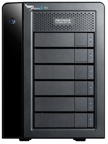
I am having issues connecting anything beyond a single Pegasus 2 to the Thunderbolt chain so I have had to do all the Target Disk Mode mirroring using a FireWire cable.
With the original Pegasus series this did not seem to be a problem. Have a trouble ticket in with Promise now.
Gary Foster submitted this photo of the T-Key dongle he made using a WD Passport drive case as an enclosure.
Alex Narvey
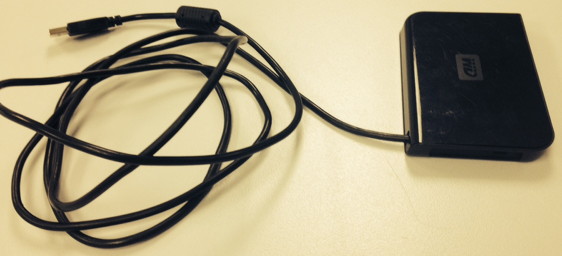
Gary Foster's "T" key dongle in a WD Passport case
T-dongle v.1.0.
I built a USB "T" key dongle and housed it in an old Apple Pro Mouse casing. Plug this sucker into any Mac, turn it on and WHAMO! instant Target Disk Mode. As long as this dingus is plugged in it is TDI all the time!
Alex Narvey
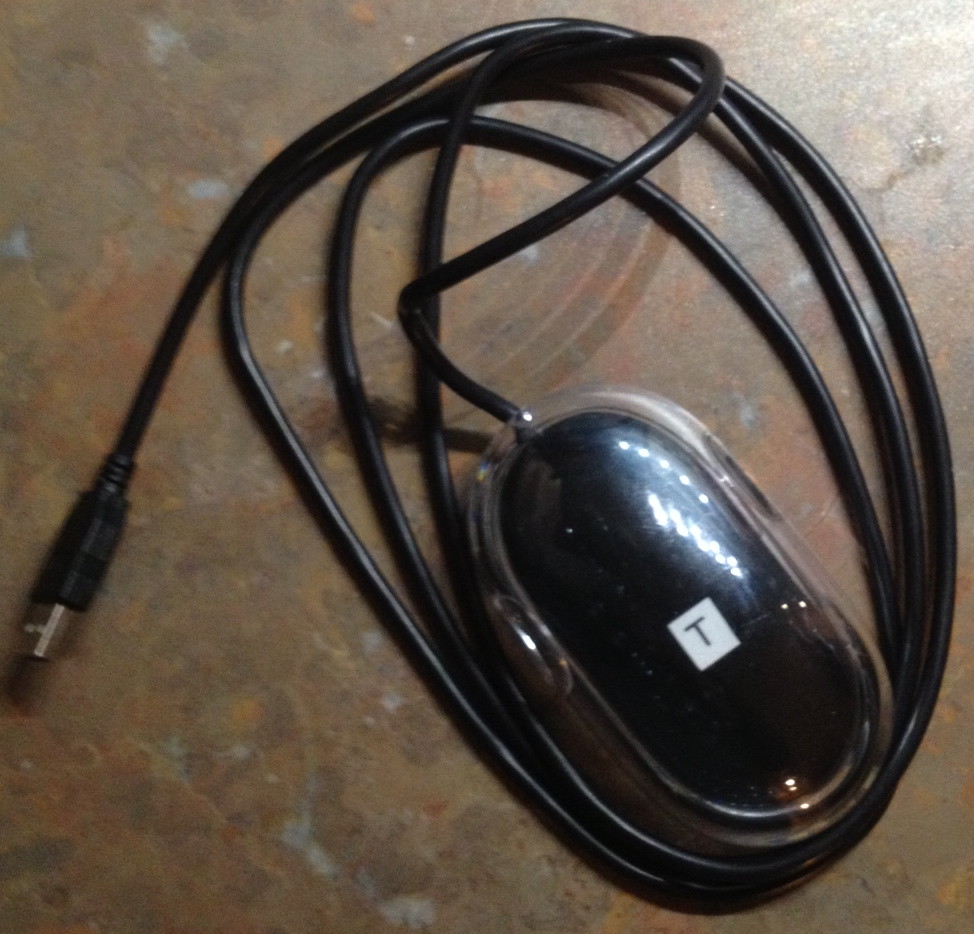
Home-made USB "T" key dongle
Mountain Lion RAIS!
Two Mac mini servers with SSDs mirrored using SoftRAID 4.33. Unlike my experiences with Lion and earliers SoftRAIDs this boots when mirrored either through Thunderbolt or FireWire. However, I am using FireWire to isolate the mirror from the Promise Pegasus RAID array and the backup drives which will all be Thunderbolt interface.
Here are the steps I took:
1) Set up the first machine (without launching the Server app yet), give it an Apple ID account for the App Store and update it to Mountain Lion 10.8.2 and Server App 2.1.1. (Still don't launch server app).
2) Download Apple's Recovery Disk Assistant and create a recovery disk on a USB key (since RAIDing will get rid of Recovery Disk on the SSD.
3) Boot from a TDM utility drive and image the computer to an external drive - Just in case.
4) While booted from the TDM utility drive, install SoftRAID drivers and convert the SSD to SoftRAID.
5) Boot from the first Mac mini and TDM the second one using Thunderbolt (for maximum mirroring speed)
6) Initialize the TDM mini to SoftRAID and use the empty volume to convert the boot drive to a SoftRAID mirror. (Using Thunderbolt took about half the time of FireWire!).
7) Shut down the first mini and connect the TDM to it via FireWire instead of Thunderbolt
8) Hook up the Pegasus via Thunderbolt and voila!
Alex Narvey

Mountain Lion RAIS 2012.pdf
Lion R.A.I.S. with SoftRAID 4.0.7 !!
Okay, having now used SoftRAID, I would have to say that trying to do a R.A.I.S. without it is crazy.
For one thing, you can install Lion to a single Apple formatted drive and not get the Recovery HD error.
Then you can convert it to a SoftRAID format and mirror it to your TDMac.
Pulling the plug on the Target Disk mode Mac to degrade the RAID was not a problem: SoftRAID rebuilt automatically and it only took TWO MINUTES whereas the Apple formatted software RAID required 8+ HOURS to rebuild.
With SoftRAID you can even add ANOTHER mirror. So if you have used the FireWire port for your TD Mac mirror you can add a USB/FW800 drive to the USB port, make it a mirror and then if one computer or the other blows up you can send it off for repair and replacement and maintain a mirror all the time just by popping that USB drive into the empty FireWire port (for best performance of course).
(With the new Thunderbolt minis your FireWire port would be available for the external drive all the time.
Add SoftRAID to the recipe book!
Alex Narvey
Lion FireWire RAIS !!
The primary was a first gen Mac mini server starting with Snow Leopard Server. The Target Disk was a regular 2.0GHz Core2Duo Mac mini with a 500 GB drive in it.
The Snow Leopard mirrored RAID COULD NOT be upgraded to Lion because the Lion Installer would not create a Recovery HD partition on a RAIDed disk set. What a pain!
I deleted the RAID set - which created two disks with Snow Leopard server on them. Then I upgraded one of the to Lion Server with an App Store upgrade. When I had a working Lion boot drive, I started from an external drive and mirrored the other mini server hard drive to the Target Disk mode computer's drive. (I made sure to choose the Option to automatically Rebuild the RAID).
Then I cloned the Lion Server to the RAIS RAID and made it the Boot drive.
Once I had a working Lion RAIS I updated it to 10.7.2 Server - no problem.
Then I pulled the power cords out of each computer. I started up the Target Disk holding the T key and then booted the Mac mini Server and it booted. However, the RAID was still intact!
So I pulled the power cord from the Target Disk Mode computer and made sure I had a degraded RAID.
Without restarting the server I started up the Target Disk Mode Mac mini using the T key and on the Server using Disk Utility I observed that the RAID was already rebuilding --without requiring a restart of the Server.
Alex Narvey
I used older Mac minis running 10.6.8 Client (since the oldest was a core solo and could not support Lion).
The target disk mini was a core solo with a 32 GB SSD in it. (No extra fan noise in TD mode).
The primary mini was a 2 GHz Core 2 Duo with a 200 GB drive in that was formatted into two partitions.
First partition was set at 31.7 GB to match the target disk mode size. Second partition was the remainder.
Booted primary off a CD. RAID mirrored the target disk to the primary (selecting the Option to automatically rebuild) and installed 10.6.3 and updated to 10.6.8.
Connected to ARD and Logmein for testing.
Pulled the power cord out of the primary so it died.
Pulled the Firewire cable out of the Target Disk mini and powered it off.
Turned on the Target Disk mini and it immediately booted. Whole operation took two minutes.
It was reachable by ARD and Logmein (although I had to log out of Logmein and back in to the website first).
Then I shut Down the Target Disk mini and started it up in Target Disk mode again.
I plugged in the FireWire cable and turned on the primary mini again.
The primary mini booted up and immediately began rebuilding the mirror!
Alex Narvey